 arcadegnt
Make trailers and TikTok shorts of your game
A finished game needs people to see it, and on TikTok, YouTube Shorts and Instagram Reels that means video. Making one usually means a screen recorder, an editor and an afternoon. With arcadegnt Gold your assistant does it in the same chat where it built the game: it records the game being played, looks at the footage, cuts it into a trailer or a vertical short with captions and an end card, and hands you a video to download or post.
Every video on this page was made that way, from three arcadegnt games, without opening a video editor.
Trailers
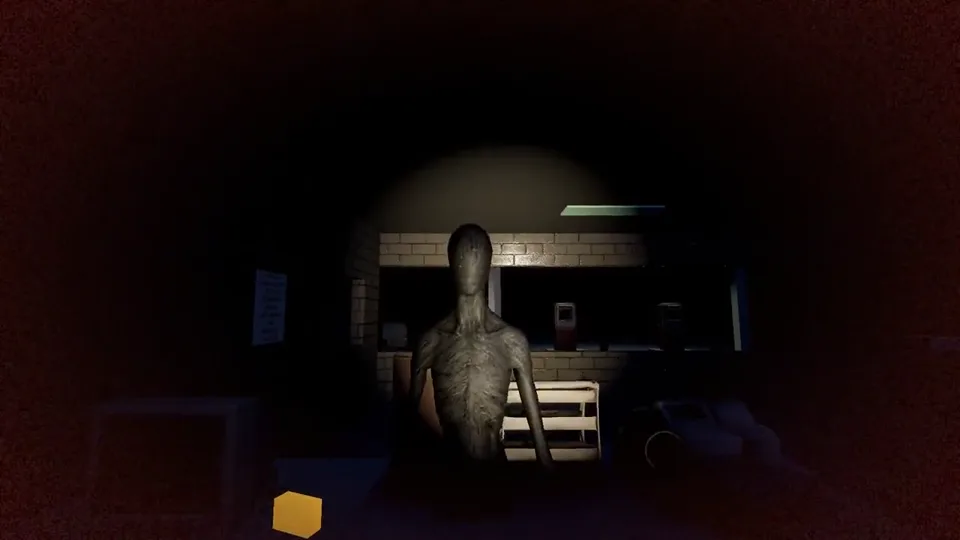
A trailer is 15 to 30 seconds: the title over the first action, the best moments with a caption each, then an end card with the game's address. This is Night Shift, a first-person horror game where something in the woods tests the doors of a lonely gas station.
Portrait games get portrait trailers. Dungeon Spin is an 8-bit bubble shooter played upright on a phone, and Lantern Trail is a cozy idle monster-trainer:
Shorts
A short is 10 to 20 seconds, vertical, with a hook in the first second and a caption on every beat. These are the three Night Shift shorts, each built around one scare:
The same tools work for a cozy game. These three Lantern Trail shorts show a lantern catch, an evolution, and a team going from 138 power to 12 million:
How it works
Three tools do the work, and your assistant calls them for you.
capture_videorecords the game. It plays your game's current build with its sound and records smooth 30 fps video, even for heavy 3D games that would stutter in a screen recorder. Your assistant scripts what happens: jump to the boss, let the game's own bot play, press the flashlight key at the right moment. It can record landscape (1920x1080), portrait (1080x1920), square, or a landscape game inside a vertical frame. It can also record as a phone, with the touch controls on screen.get_videoshows the footage. Your assistant gets a contact sheet of eight frames from each video and checks them the way a viewer would: is the creature actually in the shot, or did it run off a second early? If a moment is missing, it records again.make_videoedits. It cuts clips together with transitions (fades, flashes, pixelate, slides) and adds release-trailer text: a title, lower thirds for features, and short-form captions with one word highlighted in the game's colour. It can mix in the game's music. Every video ends on a card with the cover art, a PLAY FREE button and the game's address, so anyone who sees it knows where to play.
Ask for it
Once your game is built, ask in plain words:
- "Make a 20-second trailer of my game for its Arcade page."
- "Make three TikTok shorts of the scariest moments, each with a hook in the first second."
- "Make a portrait trailer, use the pixel font, and match the game's gold colour."
- "Recut short two so it opens on the reveal."
Your assistant shows you the contact sheet and a download link. Download links work for an hour; your account page keeps every video for 30 days, so download the ones you want to keep.
On your Arcade page
Gold games can show a trailer and up to three more videos on their page in the Arcade. Ask your assistant to add them. They go to review with the game, and once a person has approved them they stay with the page. Players see the trailer right under the game, and it only loads when they press play.
Posting them
The videos are ready for TikTok, YouTube Shorts and Instagram Reels as they are. If your assistant is connected to a social scheduling tool in the same chat, it can post them for you: one a day, with the game's address in every caption. That's how the Night Shift shorts above were scheduled, in the same conversation that made them.
Tips for better footage
- Give your game shortcuts. The best footage comes from
goto:states that jump straight to the good parts (a boss, an evolution, a jump scare). Ask your assistant to add them when it builds the game; most arcadegnt games already have them for testing. - Make the bot play well. Games with a bot (
autoplay) record themselves. A bot that loses in two seconds makes a short video. Ask your assistant to improve it if the footage ends early. - Every capture starts fresh. It plays as a new player with no save, so later moments come from
goto:states, not from an earlier capture. - Try the script first. Captures are limited each day, so for a long script your assistant can run it through
check_gamefirst and look at the screenshots.
Limits
Videos come with arcadegnt Gold. Each day you get 10 captures and 40 edits (60 and 200 per 30 days). Each capture can run up to 30 seconds and each edit up to 120 seconds, and one video is made at a time. 2D games usually record in a minute or two. 3D games take 3 to 6 minutes for 15 seconds of 1080p, so your assistant records several short clips rather than one long one.